
Small changes to a workstation can make a meaningful difference in how comfortably and efficiently someone works. The right desk accessories can help position frequently used equipment, organize the work surface, support different working heights, and address limitations in an existing desk setup.
BodyBilt offers workplace accessories for a range of needs, including foot support, laptop positioning, document placement, desk height, standing comfort, and workstation organization. These tools can be used individually or combined with office seating, monitor arms, and keyboard systems to create a workspace that better fits the person using it.
Explore BodyBilt Desk Accessories
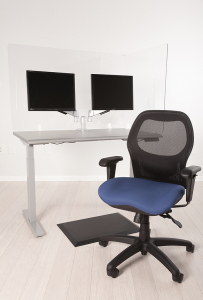
Choose Desk Accessories Based on the Problem You Need to Solve
An office accessory should have a purpose. Start with the part of the workstation that is creating difficulty, then choose a tool designed to address that specific issue.
A laptop screen sitting too low calls for a different solution than feet that cannot comfortably reach the floor. A workstation that needs a little additional height presents another problem entirely.
Here is how the main BodyBilt desk accessories fit into common workplace needs.
Footrests for Added Lower-Body Support
A footrest provides a stable surface beneath the feet when the floor does not offer comfortable support in the user’s preferred seated position. This can be particularly useful when desk height or workstation requirements prevent someone from lowering their chair enough to place both feet comfortably on the floor.
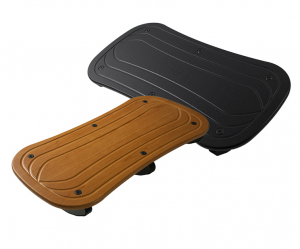
BodyBilt’s Synchrona Footrest is available in standard and extra-width configurations, providing options for different workstation needs.
Position a footrest so both feet can rest comfortably on its surface without forcing the knees excessively upward. The goal is stable support while allowing the user to maintain a comfortable seated position.
A footrest should also be considered alongside chair and desk height. Adjusting only one component can create another positioning problem elsewhere in the workstation.
Laptop Stands for Better Screen Positioning
Laptops create a basic workstation challenge: the keyboard and screen are permanently connected.
Place the keyboard at a comfortable typing height and the display may sit too low. Raise the laptop for a better viewing position and the built-in keyboard may become too high for comfortable extended use.
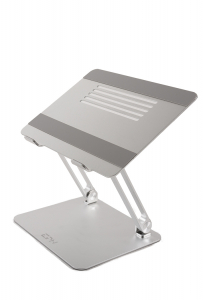
A laptop stand helps solve the screen-positioning side of that equation by elevating the display. BodyBilt’s Laptop Riser accommodates laptops from 11 to 17 inches and provides tool-free height and angle adjustment. Its foldable aluminum design also makes it suitable for home offices and mobile work setups.
For extended computer work, consider pairing an elevated laptop with an external keyboard and mouse. A keyboard system can provide additional control over input-device placement.
Desk Risers for Work Surface Height
Sometimes the problem is the desk itself.
A work surface that sits too low can cause a user to adapt their posture around the furniture. Desk risers provide a straightforward way to add height to a compatible fixed desk without replacing the entire workstation.
BodyBilt’s Varia Desk Risers are available as a set of four.
Before installing desk risers, confirm that the desk construction is appropriate and that raising the surface will not create problems with stability, cables, storage, monitor positioning, or other workstation components.
For users who need to change work surface height regularly rather than make a fixed correction, a height-adjustable table may be a better fit.
Document Holders for Reading and Data Entry
Frequently moving between a document and computer screen can lead to repeated head, neck, and eye movement throughout the workday. A document holder places reference materials closer to the user’s normal viewing area.
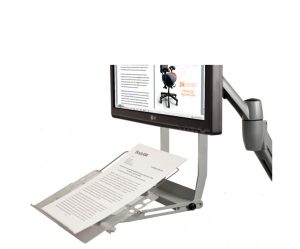
BodyBilt’s Guide Document Holder attaches to a monitor arm through a VESA mount and can accommodate documents of different sizes. It also provides five-way tool-free adjustment.
For document-heavy tasks, position reference material close to the screen and at a comfortable viewing height. This can be particularly useful for data entry, transcription, accounting, administrative work, and other roles that require frequent movement between paper and digital information.
Explore the Guide Document Holder for additional product details.
Workstation Organization and Visibility
A comfortable workstation also needs to function efficiently. Accessories that improve lighting, equipment placement, and usable desk space can reduce clutter and make frequently used tools easier to access.
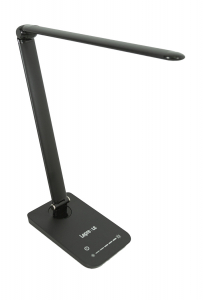
BodyBilt’s desk accessory selection includes the LED Desk Lamp and Desk Shield, while products such as monitor arms can lift displays away from the work surface and reclaim valuable desktop space.
Think about where frequently used items sit before adding accessories. The goal is not to fill the desk with more equipment. A good workstation setup keeps essential tools accessible while preserving enough open space to work comfortably.
Accessories for Sitting and Standing Comfort
Some workstation needs extend beyond the desktop.
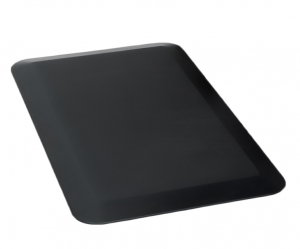
BodyBilt’s Anti-Fatigue Mat provides cushioning underfoot for employees who spend portions of the workday standing, making it a natural companion to a sit-stand or height-adjustable workstation.
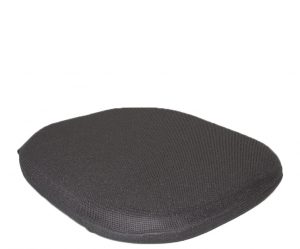
The Stratta Seat Cushion serves a different purpose. It is designed to fit over the front edge of an existing mesh seat and adds two inches of high-density foam. BodyBilt offers the cushion in medium and large sizes, with configurations supporting seat pans for individuals up to 500 pounds.
These accessories can help organizations adapt existing workstations without necessarily replacing every major piece of furniture.
Desk Accessory Comparison Guide
| Accessory Type | Primary Benefit | Compatibility Consideration | Recommended Application |
| Synchrona Footrest | Provides a stable surface for the feet | Confirm available floor space and preferred seated position | Desks where the user cannot comfortably support both feet on the floor |
| Laptop Stand | Raises and angles a laptop display | BodyBilt Laptop Riser fits 11″ to 17″ laptops | Laptop-based office, home and hybrid workstations |
| Varia Desk Risers | Adds height to a fixed work surface | Desk construction and stability should be checked first | Fixed desks that require additional working height |
| Guide Document Holder | Positions reference documents closer to the viewing area | Attaches to a compatible monitor arm using a VESA mount | Data entry and document-intensive work |
| Anti-Fatigue Mat | Adds cushioning beneath a standing user | Requires adequate floor space | Sit-stand and standing workstations |
| Stratta Seat Cushion | Adds cushioning to an existing mesh seat | Select the appropriate cushion size and seat configuration | Existing mesh seating requiring additional cushioning |
| LED Desk Lamp | Adds task lighting to the work surface | Consider available desk space and placement | Workstations requiring supplemental lighting |
Product-specific compatibility should always be confirmed before ordering.
How to Fit Desk Accessories Into Your Workstation
Accessories work best when the workstation is evaluated as a complete system.
Start with the employee’s normal working position. Adjust the office chair first, then evaluate desk height, keyboard and mouse placement, screen position, and foot support.
From there:
- Check foot support. If the user’s feet cannot rest comfortably on the floor after the chair is properly adjusted, consider a footrest.
- Evaluate screen height. Raise a laptop or reposition a monitor if the display requires repeated downward viewing.
- Review keyboard placement. The keyboard and mouse should remain easy to reach without unnecessary shoulder elevation or forward reaching.
- Position documents close to the screen. Frequently referenced materials should not require constant turning or looking down.
- Assess desk height. A fixed work surface that is too low may benefit from desk risers, while users requiring frequent height changes should consider an adjustable table.
- Remove unnecessary clutter. Accessories should improve the workstation rather than reduce usable working space.
After setup, use the workstation normally for a period of time and make small adjustments. Practical use often reveals positioning issues that are not obvious during initial installation.
Build a Workstation Around the Person Using It
There is no universal workstation layout. Equipment, body size, daily tasks, desk dimensions, and working preferences all influence which desk accessories make sense.
BodyBilt offers ergonomic tools that can be combined with seating and workstation solutions to address specific needs instead of forcing employees to work around fixed equipment.
Need help identifying the right accessories for an individual workstation or larger office project?
FAQ
Useful office desk accessories include footrests, laptop stands, document holders, monitor arms, keyboard systems, desk risers, and anti-fatigue mats. The right accessory depends on the workstation problem you are trying to solve, such as unsupported feet, poor screen positioning, limited desk height, or difficult document placement.
A footrest may be useful if your chair and desk are correctly positioned but your feet cannot comfortably rest on the floor. It should provide stable support without forcing the knees into an uncomfortable position.
A laptop stand can raise the screen to a more comfortable viewing position, particularly during extended computer use. For longer work sessions, an external keyboard and mouse can allow the elevated laptop screen and input devices to be positioned independently.
Place frequently referenced documents close to the monitor and within a comfortable viewing area. Keeping paper materials near the primary screen can reduce repeated movement between the desk surface, document, and display.
No. Desk dimensions, construction, mounting space, equipment size, and existing workstation components can affect compatibility. Measure the workspace and review the specifications for each accessory before purchasing.