
Sitting discomfort can make it harder to concentrate, stay productive, and get through a full workday comfortably. The source of that discomfort varies from person to person, which is one reason a standard office chair configuration does not work equally well for everyone.
BodyBilt takes a personalized approach to workplace seating. Adjustable lumbar and thoracic support, multiple seat configurations, armrest options, head and neck support, and other features can be configured around the user and their workstation. The goal is not to treat a medical condition. It is to create a seated position that provides appropriate support, distributes pressure more effectively, and helps the user remain comfortable while working.
Explore our customizable office seating or request a personalized consultation to discuss your workstation and seating requirements.
Notice: This page provides general educational information about sitting comfort and workplace seating. BodyBilt products are not intended to diagnose, treat, cure, or prevent medical conditions. Persistent, severe, or unexplained pain, numbness, weakness, or other symptoms should be discussed with a qualified healthcare professional.
How Customizable BodyBilt Chairs Help Relieve Your Pain
1
Neck support options reduce nerve pain.
2
Pressure-reducing, contoured seat pan also reduces the pain of sciatica, while unique seating options resolve tailbone discomfort.
3
Precise adjustments put you in a position to be pain-free
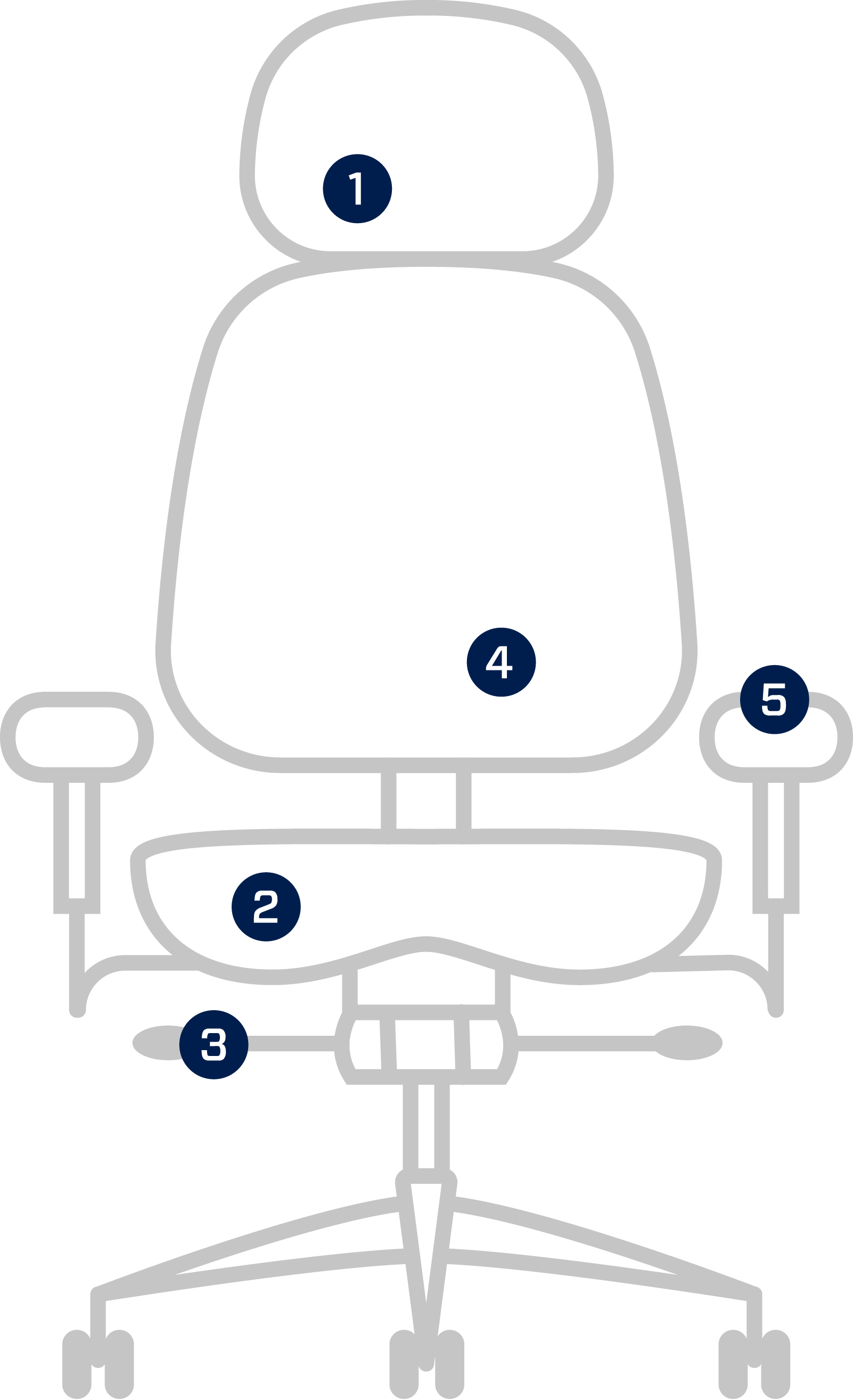
4
Unique lumbar and thoracic support options provide relief for upper and lower back pain.
5
Specialized armrests relieve unique pain problems such as carpal tunnel.
How Chair Adjustability Can Support Sitting Comfort
A comfortable chair starts with fit. Seat depth, back support, arm position, seat contour, and workstation height all affect how the body is supported while sitting.
BodyBilt chairs offer configurable and adjustable features that allow users to change their seated position based on body dimensions, working style, and individual comfort preferences.
Important areas include:
Lumbar and Thoracic Support
The lumbar region has a natural inward curve. Adjustable lumbar support can help support that area rather than leaving the lower back unsupported or requiring the user to lean forward.
The thoracic region covers the middle and upper portion of the back. Appropriate backrest support can help the user maintain a comfortable seated position without relying solely on their muscles to hold the torso upright.
Seat Depth and Seat Position
Seat depth affects where the body rests on the seat and how much space remains behind the knees. A seat that extends too far forward may contact the back of the legs, while a seat that is too shallow may not provide enough support beneath the thighs.
Adjustable seat depth allows the chair to better accommodate different body dimensions.
Armrest Position
Armrests should support the arms without forcing the shoulders upward or requiring the user to reach outward. Depending on the chair, adjustable arms may allow changes to height, width, angle, or position.
Proper arm support can be especially important for employees who spend significant portions of the day typing, using a mouse, or performing repetitive desk tasks.
Head and Neck Support
Some users prefer additional support behind the head or neck, particularly when reclining or performing tasks that keep them seated for extended periods.
A properly positioned headrest should support a comfortable head position without pushing the head forward. Head and neck support should work with the backrest rather than compensate for a poorly adjusted chair.
Waterfall Seat Edges
A waterfall seat edge slopes downward near the front of the seat instead of creating a hard edge behind the knees. This design can help reduce concentrated pressure where the thighs meet the front of the seat.
Seat shape is only one part of the overall fit, so it should be considered together with seat depth, height, contour, and cushioning.
Office Chair Support for Lower Back Discomfort
Lower back discomfort is a common concern among people who spend substantial time sitting. Chair fit, lumbar positioning, seat depth, desk height, working posture, and how frequently someone changes position can all affect sitting comfort.
An adjustable chair allows the user to position lumbar support closer to the natural curve of the lower back. Seat height and depth can then be adjusted so the user is supported by both the seat and backrest rather than continually leaning forward or sliding toward the front of the chair.
The workstation matters too. A well-adjusted chair cannot compensate for a monitor positioned too far away or a keyboard that requires constant reaching. BodyBilt’s office seating solutions can be combined with adjustable workstation tools to address the complete seated setup.
Neck and Shoulder Discomfort While Sitting
Neck and shoulder discomfort at a desk can be influenced by more than the chair. Screen height, keyboard placement, arm support, reaching distance, and working habits all affect upper-body positioning.
Start by checking the armrests. They should support the forearms while allowing the shoulders to remain relaxed. Then look at the monitor. A screen positioned too low, too high, or too far to one side can encourage repeated changes in head position.
An adjustable monitor arm can provide greater control over screen positioning, while a keyboard system can help position the keyboard and mouse independently of the main work surface.
Users who prefer additional support when reclining may also want to consider chair configurations with appropriate head and neck support.
Tailbone Pressure and Seated Comfort
The tailbone, or coccyx, can become an area of concern when someone experiences concentrated pressure while sitting. Seat shape, cushioning, posture, pelvic position, and the amount of uninterrupted sitting time can all influence how pressure feels in this area.
A chair with an appropriately sized and contoured seat can help distribute seated pressure across a broader surface. BodyBilt offers multiple seat configurations because users differ in height, width, proportions, and comfort preferences.
Seat depth is also important. The chair should support the thighs without requiring the user to slide forward or sit in an awkward position to reach the backrest.
People experiencing persistent or significant tailbone pain should seek guidance from a qualified healthcare professional rather than relying on a chair as a medical solution.
Sciatica-Related Sitting Concerns
Sciatica refers to symptoms associated with irritation or compression affecting the sciatic nerve. Because causes and symptoms vary, an office chair should not be presented as a treatment for sciatica.
For someone who experiences sciatica-related discomfort while sitting, the practical objective is to create a workstation that supports a comfortable position without adding unnecessary pressure. Seat contour, seat depth, lumbar support, cushioning, and the ability to change position may all be relevant considerations.
Movement also matters. No chair eliminates the need to change positions during the day. When work allows, users should periodically stand, walk, or change posture rather than remaining in one position for an entire shift.
For employees who spend particularly long hours seated, explore BodyBilt’s intensive-use office chairs for seating designed around extended and multi-shift workplace demands.
Adjust Your Office Chair Before Replacing It
An uncomfortable chair is not always the wrong chair. Sometimes the existing chair simply needs to be fitted correctly.
Before considering a new seating configuration, work through these adjustments in order:
- Set the seat height. Adjust the chair so your feet are supported by the floor or an appropriate footrest and your working surface remains comfortably accessible.
- Check the seat depth. Sit fully against the backrest and make sure the seat supports your thighs without pressing firmly into the backs of your knees.
- Position the lumbar support. Adjust the lumbar area so it comfortably supports the natural curve of your lower back rather than pushing aggressively against it.
- Adjust the backrest. Find a back angle that supports your torso while still allowing you to comfortably reach your work.
- Set the armrests. Support your forearms without raising your shoulders. Keep your arms close enough to the body that you do not need to reach outward.
- Check head and neck support. If your chair includes a headrest or neck support, position it so it supports you without pushing your head forward.
- Reposition your monitor. Bring the primary display to a comfortable viewing height and distance. Avoid repeatedly turning or looking significantly downward to see your main screen.
- Check the keyboard and mouse. Keep both close enough that you can use them without excessive reaching or shoulder movement.
- Sit and work before making another change. Give each adjustment time. Changing several settings at once can make it difficult to determine what actually improved or worsened comfort.
- Keep moving. Even a properly fitted chair should not keep you in one fixed position for an entire workday.
BodyBilt also provides chair adjustment videos to help users understand available chair controls.
When a More Personalized Chair Configuration Makes Sense
Body dimensions, workstation requirements, job responsibilities, and personal comfort preferences can make a standard seating configuration unsuitable for some users.
BodyBilt offers different seat sizes, contours, back configurations, arm options, lumbar support features, and other adjustments that can be selected around the individual. A consultation can be especially useful when an employee has already tried routine chair adjustments and still cannot find a comfortable working position.
Organizations may also need different seating solutions across their workforce. Someone working at a standard administrative workstation has different demands from an employee sitting through extended shifts in a control room.
The objective is to select a chair based on the user and application rather than expecting every employee to adapt to the same seat.
Look at the Entire Workstation, Not Just the Chair
Chair adjustments are only effective when the rest of the workstation supports them.
Monitor position, desk height, keyboard location, mouse placement, foot support, and frequently used equipment can all influence sitting position. A user may have an appropriately adjusted chair but still lean forward because the monitor is too far away or raise their shoulders because the desk is too high.
BodyBilt offers ergonomic tools and height-adjustable tables that can be used alongside seating to create a more adaptable workstation.
A complete assessment should consider the person, chair, work surface, equipment, and tasks together.
Find a Seating Configuration Built Around You
Workplace comfort is personal. A chair that fits one employee well may be poorly suited to another, especially when body dimensions, workstation design, and daily tasks differ.
BodyBilt can help evaluate your seating needs and identify configurable options designed to support a more comfortable seated working position.
Daniel K.
Frequently Asked Questions
There is no single chair that is best for everyone experiencing lower back discomfort. Look for seating with adjustable lumbar support, appropriate seat depth, backrest adjustment, and enough overall adjustability to fit your body and workstation. Persistent back pain should be evaluated by a qualified healthcare professional.
A properly fitted ergonomic office chair may support a more comfortable seated position by providing adjustable support and helping distribute seated pressure. A chair is not a medical treatment, and comfort also depends on workstation setup, movement, working habits, and individual needs.
Seat contour, cushioning, seat depth, and pelvic positioning can affect how pressure is distributed while sitting. An appropriately fitted seat may help avoid excessive concentrated pressure, but ongoing or severe tailbone pain should be discussed with a healthcare professional.
Start by adjusting the armrests so your forearms are supported without raising your shoulders. Then check your backrest, monitor height, viewing distance, keyboard, and mouse placement so you are not repeatedly reaching forward or turning your head during normal work.
Not necessarily. First check seat height, seat depth, lumbar support, armrests, backrest position, and the surrounding workstation. If proper adjustments still do not provide a comfortable fit, a different chair size or configuration may be appropriate, and BodyBilt can help assess available seating options.