
Buying office chairs for your business sounds simple until you start considering how many different…
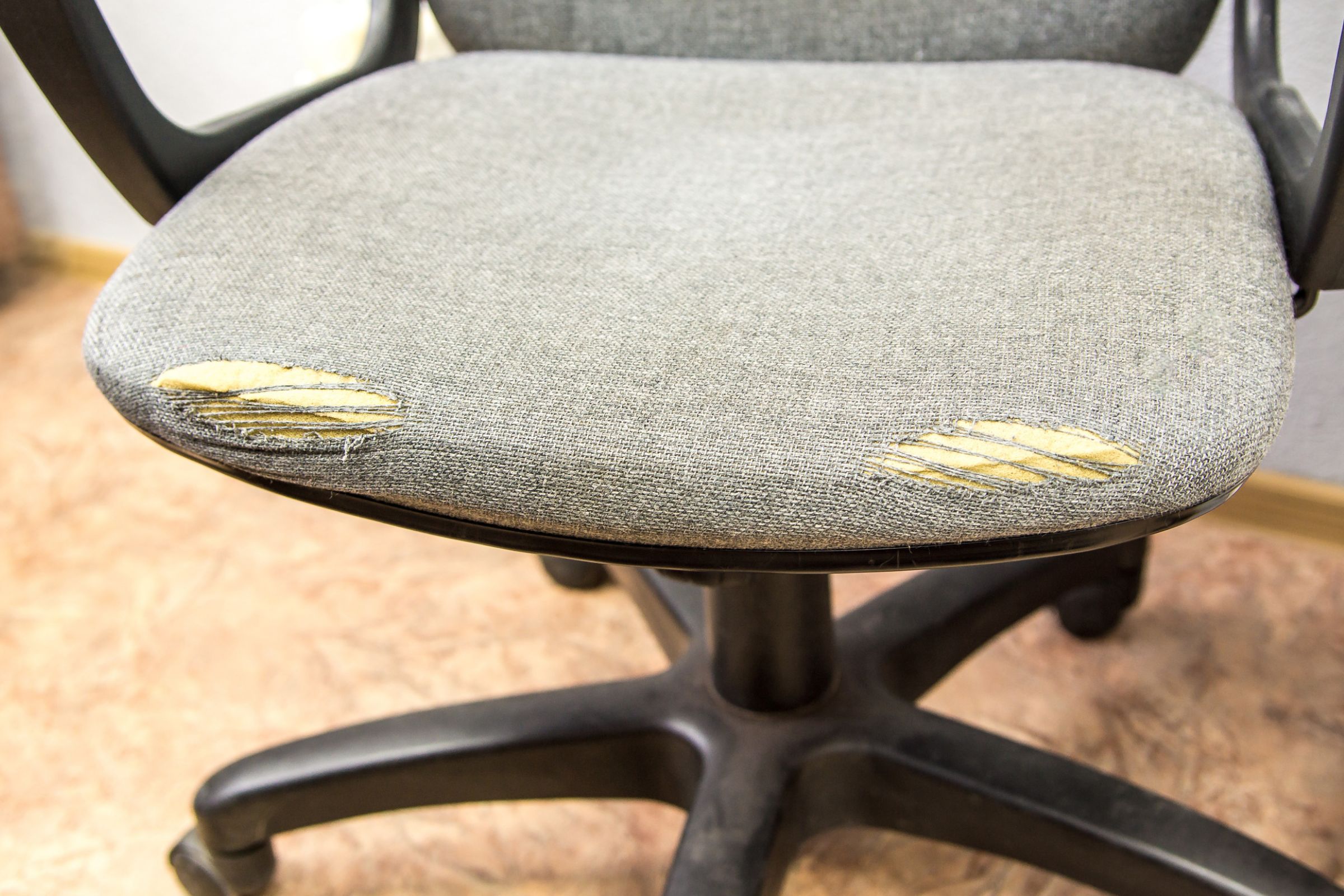
Should You Repair or Replace Your Office Chair?
Your office chair has started sinking during the day. Maybe one of the armrests is loose, the wheels aren’t rolling smoothly or the seat cushion doesn’t feel as supportive as it used to.
Does that mean you need a new chair? Not always.
Some office chair problems can be addressed through maintenance or replacement components. Others may indicate that the chair is no longer safe, practical or comfortable enough for continued use.
The right decision depends on what’s wrong, how old the chair is, whether parts are available and what a repair would cost compared with replacing it.
Before throwing out a chair or spending money on repairs, here’s what to check.
Is It Worth Repairing an Office Chair?
An office chair is often worth repairing when the problem affects a replaceable component, the chair remains structurally sound and the total repair cost is reasonable.
For example, a worn caster or damaged arm pad may be simpler to address than a cracked base or failing seat mechanism.
However, repairs aren’t always the best investment. If the chair has multiple problems, no longer fits the user or requires expensive work, replacement may provide better long-term value.
Start with three questions:
- Is the chair safe to use? Structural damage, instability and failing mechanisms need prompt attention.
- Can the problem be repaired? Check whether the manufacturer supports service or replacement components.
- Does the repair make financial sense? Compare the full cost with the price and expected value of a suitable replacement.
For owners of BodyBilt seating, the BodyBilt Customer Service team can help with product support and warranty questions.
7 Signs Your Office Chair May Need Repair or Replacement
Office chairs experience wear over time, particularly in busy workplaces.
These common problems can help you determine what to investigate first.
1. Your Office Chair Keeps Sinking
If your chair gradually lowers after you’ve adjusted the height, the pneumatic cylinder or height-control system may be malfunctioning.
A failing cylinder can make it difficult to maintain a suitable working position.
What to do: Stop relying on the faulty height adjustment and contact the manufacturer or an authorized service provider to determine whether the component can be replaced.
Do not attempt to open, puncture or dismantle a pressurized cylinder.
If the chair is otherwise in good condition, an authorized component replacement may be more practical than purchasing a new chair.
2. The Chair Wobbles or Feels Unstable
An office chair should remain stable during normal use.
Unexpected rocking, excessive movement or a loose connection between major components can indicate a problem that requires inspection.
Possible causes include damaged casters, loose connections, worn mechanisms or structural damage.
What to do: Remove an unstable chair from use until the problem has been identified.
Minor service issues may be repairable, but a cracked base or compromised structural component should not be treated as a simple do-it-yourself fix.
3. The Wheels Are Sticking or Damaged
Chair casters can collect hair, dust and debris that interfere with movement.
Some problems may be resolved through appropriate cleaning. Others may require replacement casters.
What to do: Inspect the wheels for visible debris, damage and uneven movement.
If cleaning does not resolve the problem, ask whether compatible replacement casters are available.
Make sure any replacement parts are approved for the chair model and intended flooring.
4. The Armrests Are Loose or Broken
Armrests experience frequent contact during normal use.
Over time, arm pads may wear down, adjustment controls may become difficult to operate or components may loosen.
What to do: Determine whether the problem affects an arm pad, adjustment control or the armrest assembly itself.
Some manufacturers provide replacement components, making a targeted repair possible.
Avoid modifying the armrest or installing unapproved parts that could interfere with the chair’s operation.
5. The Seat Cushion Has Lost Its Support
Seat foam and upholstery can change with prolonged use.
A chair may develop compressed areas, visible fabric wear or an uneven sitting surface.
A worn cushion isn’t always a reason to replace the entire chair, but it deserves attention if the seat no longer supports the user comfortably.
What to do: Ask whether the manufacturer offers an appropriate seat or upholstery replacement.
Compare that cost with the condition of the remaining chair components.
6. The Backrest or Recline Mechanism No Longer Works
A chair’s backrest and recline controls help users change seated positions.
If the backrest no longer holds its intended setting, the recline mechanism behaves unpredictably or an adjustment control stops working, the chair may require service.
What to do: Stop using the faulty adjustment and request an inspection.
A mechanism problem should be evaluated by an authorized service provider rather than bypassed with improvised repairs.
7. The Chair No Longer Fits the Person Using It
Sometimes the chair isn’t broken at all.
An employee may have inherited a chair that is too large, too small or unsuitable for their desk.
Changes in job duties or workstation arrangements can also make previously acceptable seating less appropriate.
What to do: Check the available adjustments first.
If the chair cannot accommodate the user’s body dimensions or work requirements, replacing it with a better-fitting configuration may be more useful than repairing an otherwise functional product.
BodyBilt offers office seating in multiple configurations for different users and workplace needs.
Office Chair Repair vs. Replacement: A Quick Comparison
Use this table as a starting point when evaluating a chair problem.
| Chair Problem | Repair May Make Sense When | Replacement May Make Sense When |
| Worn Casters | Approved replacement wheels are available | The chair also has major structural or mechanical problems |
| Damaged Arm Pad | The manufacturer offers a compatible part | Multiple components are worn and repair costs are high |
| Sinking Seat | The cylinder can be professionally replaced | The chair has additional damage or limited parts support |
| Worn Seat Cushion | A suitable replacement seat is available | The chair no longer fits the user or has several failing components |
| Faulty Recline Control | An authorized repair is available and economical | The mechanism is beyond practical repair |
| Cracked Base | Manufacturer-approved structural replacement is possible | Safe repair is unavailable or impractical |
| Poor Chair Fit | Adjustments can resolve the issue | The chair’s dimensions cannot accommodate the user |
Important: This table is a decision guide, not a repair authorization. A damaged or unstable chair should be removed from use until its condition has been assessed.
How Much Does It Cost to Repair an Office Chair?
Office chair repair costs depend on the damaged component, the chair model, parts availability and whether professional labor or shipping is required.
A simple component replacement may cost substantially less than purchasing a new chair. More extensive repairs can become expensive, especially when multiple parts need attention.
Before approving a repair, ask for an estimate that includes:
- Replacement parts
- Service labor
- Shipping or transportation
- Any required inspection
- Applicable taxes or additional charges
- Expected turnaround time
Then compare that amount with the cost of a suitable replacement chair.
A Simple Way to Compare the Costs
Imagine a chair needs a repair costing $150, while a suitable replacement costs $600.
The repair represents 25% of the replacement price.
That doesn’t automatically make repairing the chair the right decision.
If the chair is otherwise in good condition and the repair restores normal function, the expense may be reasonable.
If the same chair has deteriorating upholstery, a worn mechanism and limited parts availability, spending more money on it may not be worthwhile.
The decision should account for the chair’s overall condition and likely continued usefulness, not just the immediate repair bill.
Check Your Office Chair Warranty Before Paying for Repairs
Before ordering parts or authorizing service, check whether the chair is still covered by a manufacturer’s warranty.
Warranty terms vary by brand, product line, component, purchase date and usage conditions.
Some warranties provide different coverage periods for structural components, mechanisms, upholstery and other parts.
Normal wear and tear may be excluded, and labor or shipping costs may not be covered.
What About BodyBilt Office Chair Warranties?
BodyBilt publishes warranty information for its seating and workstation products.
Coverage varies by product category and component, so it’s important to review the terms that apply to your specific chair.
The company’s seating warranty documentation also addresses service procedures, replacement components and circumstances in which repairs may affect coverage.
Before arranging third-party repairs or modifying a BodyBilt chair, contact the company to confirm the appropriate service process.
Visit BodyBilt Warranty Information or BodyBilt Customer Service for current product support details.
How Long Should an Office Chair Last?
There is no single lifespan that applies to every office chair.
A chair’s useful life depends on its construction, daily use, maintenance, environment and the condition of its individual components.
A chair used for occasional desk work may experience different wear from one occupied throughout multiple shifts.
The type of seating also matters.
Conventional office chairs are not necessarily intended for the demands of a continuously staffed workplace.
For control rooms, dispatch centers and similar environments, BodyBilt offers intensive-use seating designed for extended and multi-shift applications.
Age Alone Doesn’t Determine When to Replace a Chair
An older chair that remains stable, adjustable and comfortable may still be suitable for continued use.
A newer chair with a damaged base or failing mechanism may need immediate attention.
Rather than replacing chairs solely because they’ve reached a certain age, evaluate their condition and whether they continue to meet the user’s needs.
Can You Replace Office Chair Parts Instead of Buying a New Chair?
Depending on the manufacturer and model, certain office chair components may be serviceable or replaceable.
Potential examples include casters, arm pads, armrest assemblies, seat components and adjustment mechanisms.
However, replacement parts are not interchangeable across all chairs.
Using a part that appears to fit but isn’t approved for the model can create safety, performance or warranty problems.
Before purchasing a replacement component:
- Identify the chair manufacturer and model.
- Locate the serial number or other identifying information.
- Describe the problem clearly.
- Ask whether a compatible replacement part is available.
- Confirm whether installation requires authorized service.
- Review the warranty implications before proceeding.
For BodyBilt chairs, the customer service department can help owners determine the appropriate next steps.
When Is Replacing Your Office Chair the Better Choice?
Replacement may be the more practical option when the chair cannot be restored to safe, reliable operation or no longer meets the user’s requirements.
Consider replacing a chair when:
- It has structural damage that cannot be safely repaired.
- Essential adjustments no longer function and service is impractical.
- Multiple components are failing.
- Compatible replacement parts are unavailable.
- Repair costs approach the price of a suitable replacement.
- The chair cannot accommodate the user’s body dimensions.
- Its construction is unsuitable for the demands of the workplace.
Choose a Replacement That Solves the Original Problem
If you’re replacing a chair because it doesn’t fit, don’t select another model with the same seat dimensions.
If the original chair wore out under continuous use, consider whether a chair intended for multi-shift operations would be more appropriate.
If employees frequently struggle with adjustment controls, look for a model with features that are easier for them to use.
Explore BodyBilt’s ergonomic seating options to compare workplace seating designed for different users and applications.
What Should Businesses Do With Damaged Office Chairs?
For businesses managing dozens or hundreds of chairs, repair-versus-replacement decisions are also a facilities and purchasing issue.
A consistent process can help organizations respond to damaged seating without automatically replacing every chair.
Create a Chair Inspection and Reporting Process
Encourage employees to report unstable chairs, damaged controls and other problems promptly.
Remove chairs with suspected safety-related defects from use until they can be evaluated.
Keep Track of Chair Models and Purchase Information
A basic inventory can help facilities teams locate product documentation, identify warranty coverage and determine whether replacement components are available.
Evaluate Repeated Problems
If several chairs develop the same issue, investigate whether the problem relates to the product, usage conditions or maintenance practices.
Recurring damage in a multi-shift workplace may indicate that the seating category needs to be reconsidered.
Plan Replacements Strategically
Rather than making isolated purchases whenever a chair fails, businesses may benefit from maintaining approved seating configurations and replacement procedures.
For organizations planning a broader seating upgrade, BodyBilt’s business purchasing resources can help connect workplace requirements with available seating options.
How to Help Your Office Chair Last Longer
Routine care can help keep an office chair functioning properly and make developing problems easier to identify.
Follow the Manufacturer’s Maintenance Instructions
Cleaning methods and maintenance requirements vary by chair model and upholstery material.
Use the product’s approved care instructions rather than applying household chemicals or lubricants without guidance.
Keep Casters and Moving Areas Clean
Dust and debris can interfere with normal chair movement.
Inspect accessible areas and clean them according to the manufacturer’s recommendations.
Avoid Overloading the Chair
Every chair has an intended capacity and use classification.
Confirm that the chair is appropriate for its user and workplace application.
Don’t Ignore Malfunctioning Controls
A control that sticks or no longer holds its setting may need service.
Continuing to use a damaged mechanism can make the problem worse or create an unsafe condition.
Use the Chair as Intended
Avoid standing on office chairs, using them as ladders or making unapproved modifications.
For BodyBilt seating, consult the product documents and applicable care instructions.
What to Look for in a Replacement Office Chair
If repair isn’t the right choice, focus on selecting a chair that will meet your needs over time.
Prioritize:
Appropriate seat dimensions: The chair should accommodate the user’s height and body proportions.
Useful adjustment features: Seat height, back support, armrests and other controls should suit the work being performed.
Suitable construction: Choose seating designed for the expected level of use.
Warranty and service support: Review coverage and understand how product issues are handled.
Workstation compatibility: The chair should function appropriately with the user’s desk and equipment.
Available configurations: A business may need different sizes or features for different employees.
BodyBilt offers adjustable office chairs, specialized seating and custom seating solutions for users whose needs go beyond a standard office chair.
Repair or Replace? Make the Decision Based on Fit, Safety and Value
A broken office chair doesn’t always need to be thrown away.
When the problem is limited to a serviceable component and the chair remains in good condition, repairing it may be the sensible choice.
When damage affects structural integrity, repairs are impractical or the chair no longer fits its user, replacement may offer greater value.
For BodyBilt owners, checking warranty and service options is a useful first step. For anyone considering a new chair, the priority should be finding seating suited to the person and the work environment.
Need Help With Your Office Chair?
If you own a BodyBilt chair and need assistance with a malfunctioning component, warranty question or service request, start with BodyBilt Customer Service.
If you’re ready to replace a chair, upgrade employee seating or find a better configuration for your workplace, BodyBilt can help you compare available options.
Talk to a BodyBilt Representative About Replacement Office Chairs
Frequently Asked Questions
Is it worth fixing an office chair?
An office chair may be worth fixing when the problem involves a replaceable component, the chair is otherwise in good condition and the repair costs substantially less than a suitable replacement. Check the manufacturer’s warranty and service options before paying for repairs.
How do I know when my office chair needs replacing?
Consider replacement if your chair has serious structural damage, essential adjustments no longer work, repairs are impractical or the chair cannot accommodate your body comfortably. Age alone isn’t the deciding factor. The chair’s condition, safety and suitability matter more.
Can a sinking office chair be repaired?
A sinking office chair may have a faulty pneumatic cylinder or height-adjustment mechanism. Depending on the chair model, an authorized service provider may be able to replace the affected component. Do not attempt to dismantle a pressurized cylinder yourself.
How many years should an office chair last?
Office chair lifespan varies based on construction, frequency of use, maintenance and workplace conditions. There is no universal replacement age. Inspect the chair periodically and evaluate whether its components remain functional, stable and appropriate for the user.
Is it cheaper to repair an office chair or buy a new one?
Repairing a chair can be less expensive when only one serviceable component needs attention. Replacing it may make more financial sense when several components are damaged, replacement parts are unavailable or the chair no longer meets the user’s needs. Compare the complete repair estimate with the cost of a suitable new chair.
Related Posts